Guide AS700
Contactez-nous
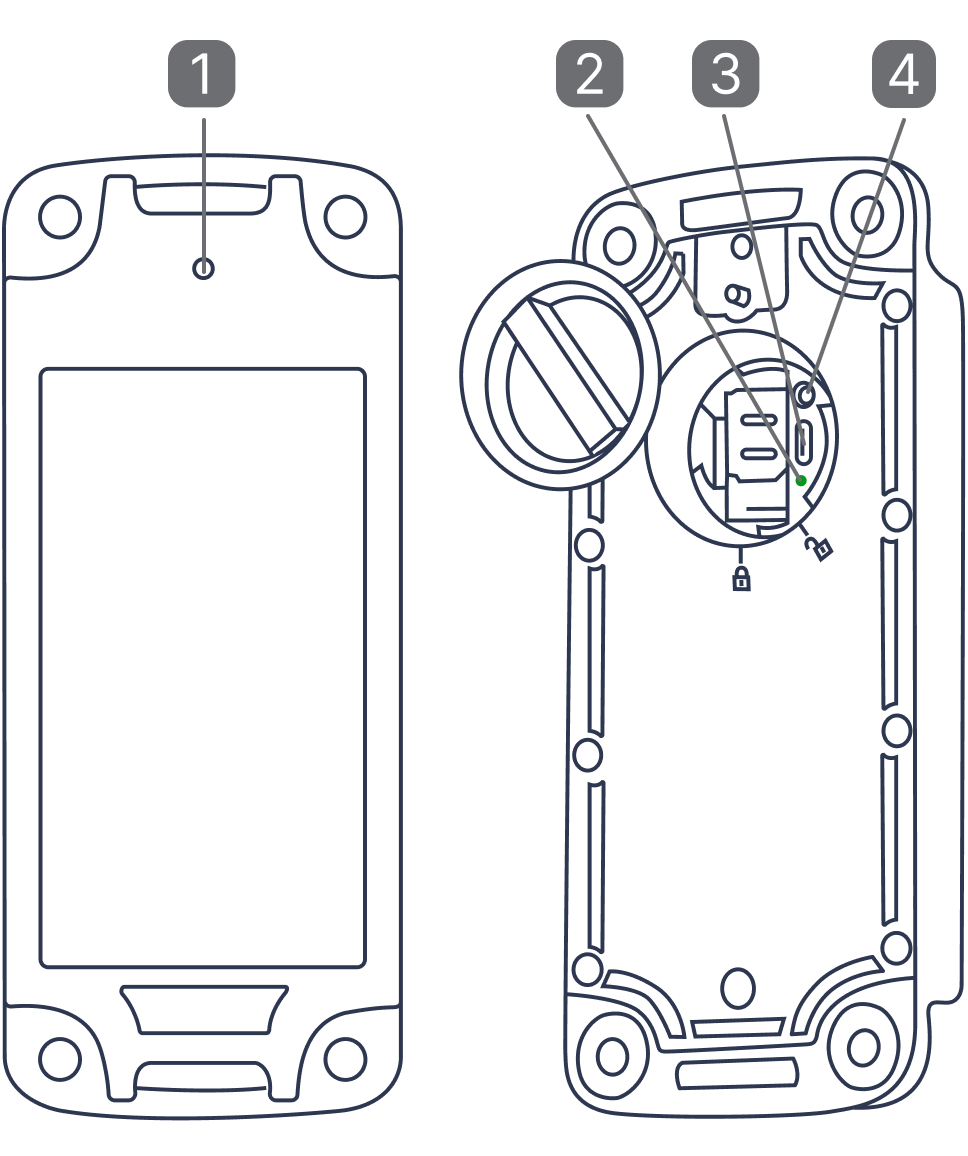
1. Status indicator
2. Light indicator
3. Charging port
4. Power button
GPS Trackers need a clear view of the sky to properly receive signals and work best when the device is outdoors, and in or under the vehicle. Wi-Fi or cellular location will be used when the GPS signal is blocked by metal enclosures (i.e a trunk of a car), concrete, trees, heavy clouds and other interference factors.
Pour commencer
Rechargez votre appareil
Avant la première utilisation, chargez l’appareil jusqu’à ce qu’un voyant vert fixe s’allume.
Lancer la localisation GPS
Appuyez sur le bouton d’alimentation et maintenez-le enfoncé pendant 3 secondes lorsque vous êtes à l’extérieur.
Vérifiez si le voyant LED passe au vert.
Éclairage

Device is starting up
Long press 3 sec

Device is powering off
Long press 3 sec

Battery capacity level
76%~100%
Single press

Battery capacity level
51%~75%
Single press

Battery capacity level
26%~50%
Single press

Battery capacity level
0%~25%
Single press

Device is charging
Flashes continuously