Guía de Myloc8

Información general
These operating instructions are for the Myloc8 tracker, which will simply be referred to as ‘tracker’ in the following. They contain important information regarding set-up and operation. Before using the tracker, please read the operating instructions carefully. This particularly applies to the safety notes. Failure to adhere to these operating instructions may result in severe injury or damage to the tracker.
The operating instructions are based on the standards and rules in force in the European Union. When abroad, you must also observe country-specific guidelines and laws. Keep the operating instructions for future use. If you pass the tracker on to third parties, please be absolutely sure, to include these operating instructions.
Configuración inicial
Installing and charging the battery
When you unpack the tracker for the first time, the battery is empty. Charge it as follows:
- Connect the charging plug of the charging cable to the tracker with the Micro USB.
- Connect the other end of the charging cable to the USB power adaptor and then to the power socket. Alternatively you can also connect the charging cable to a computer.
- Charge the tracker for 2 hours.
- The red light will blink whilst charging. When the tracker is fully charged, the light will turn solid red
- Disconnect the tracker from the charging cable.
Turning the tracker on
- Take the tracker outside so that it is in the open air.
- Verify tracker is ON by pressing and hold the ON/OFF button. Red light will blink.
- Place the tracker down and leave it for at least 15 minutes. This allows the tracker to perform its initial GPS positioning, which is required for the device to function correctly.
Once completed, the tracker will be ready for use and can be activated.
Please note: this procedure is only required the very first time the tracker is turned on.
Activating the tracker via Web
- Open your internet browser and go to myloc8.com
- Register and create your Myloc8 account, then wait for the activation email from Myloc8, click on the confirmation link, then login.
- Click on “Add Tracker” and follow the on-screen instructions.
- Insert your tracker IMEI and Device ID, and follow the instructions to activate your service plan.
Activating the tracker via App
- Download the Myloc8 app from the Apple Store or Google Play.
- Register or log into your Myloc8 account.
- Tap on "+" icon to add the device and follow the activation instructions.
Notificación
La batería está baja
Cuando el porcentaje de batería baje al 10 %, se activará una alerta a través de todos los métodos de comunicación que hayas elegido. El número de teléfono o la dirección de correo electrónico que hayas indicado recibirán los datos de ubicación junto con un mensaje de texto.
Entrada en la zona / Salida de la zona
Una geovalla es un límite virtual que puedes personalizar. Cada vez que el localizador cruce ese límite, ya sea al salir o al entrar en la zona definida, recibirás una notificación en la app. Además, el número de teléfono o la dirección de correo electrónico que hayas indicado recibirán la información de ubicación junto con un mensaje de texto.
Ten en cuenta que hay un periodo de espera de 5 minutos entre dos alertas consecutivas.
Se ha pulsado la tecla SOS
Cuando mantengas pulsado el botón SOS durante al menos 2 segundos, se enviarán tanto la información de ubicación como un mensaje de texto al número de teléfono o a la dirección de correo electrónico que hayas facilitado previamente.
Límite de velocidad
Una vez que el usuario establezca un límite de velocidad para el dispositivo, recibirá una notificación en la app cada vez que el localizador supere la velocidad establecida. En esos casos, el usuario también recibirá la información de ubicación y un mensaje de texto enviado al número de teléfono o a la dirección de correo electrónico que haya facilitado.
Ten en cuenta que hay un periodo de espera de 5 minutos entre alertas consecutivas.
Empieza a moverte
En cuanto el localizador empiece a moverse, se te avisará en la app. Además, se enviará la información de ubicación y un mensaje de texto al número de teléfono o a la dirección de correo electrónico que hayas facilitado.
Ten en cuenta que hay un periodo de espera de 5 minutos entre dos alertas seguidas.
Botón derecho / izquierdo
Al pulsar cualquiera de los dos botones, puedes enviar un mensaje al número de teléfono o a la dirección de correo electrónico que hayas facilitado. El mensaje de texto predeterminado será «Se ha pulsado el botón izquierdo» o «Se ha pulsado el botón derecho», pero tienes la opción de personalizar el mensaje de cada botón según tus preferencias.
Además, la información de ubicación, junto con el mensaje de texto personalizado, se enviará al número de teléfono o a la dirección de correo electrónico que hayas facilitado. Ten en cuenta que hay un periodo de espera de 5 minutos entre dos alertas consecutivas.
Encendido / Apagado
Cuando el dispositivo esté completamente cargado y encendido, se activará una notificación para avisarte de que se ha encendido. Del mismo modo, cuando el dispositivo se apague, se te enviará un mensaje para avisarte de que se ha apagado.
Paquete
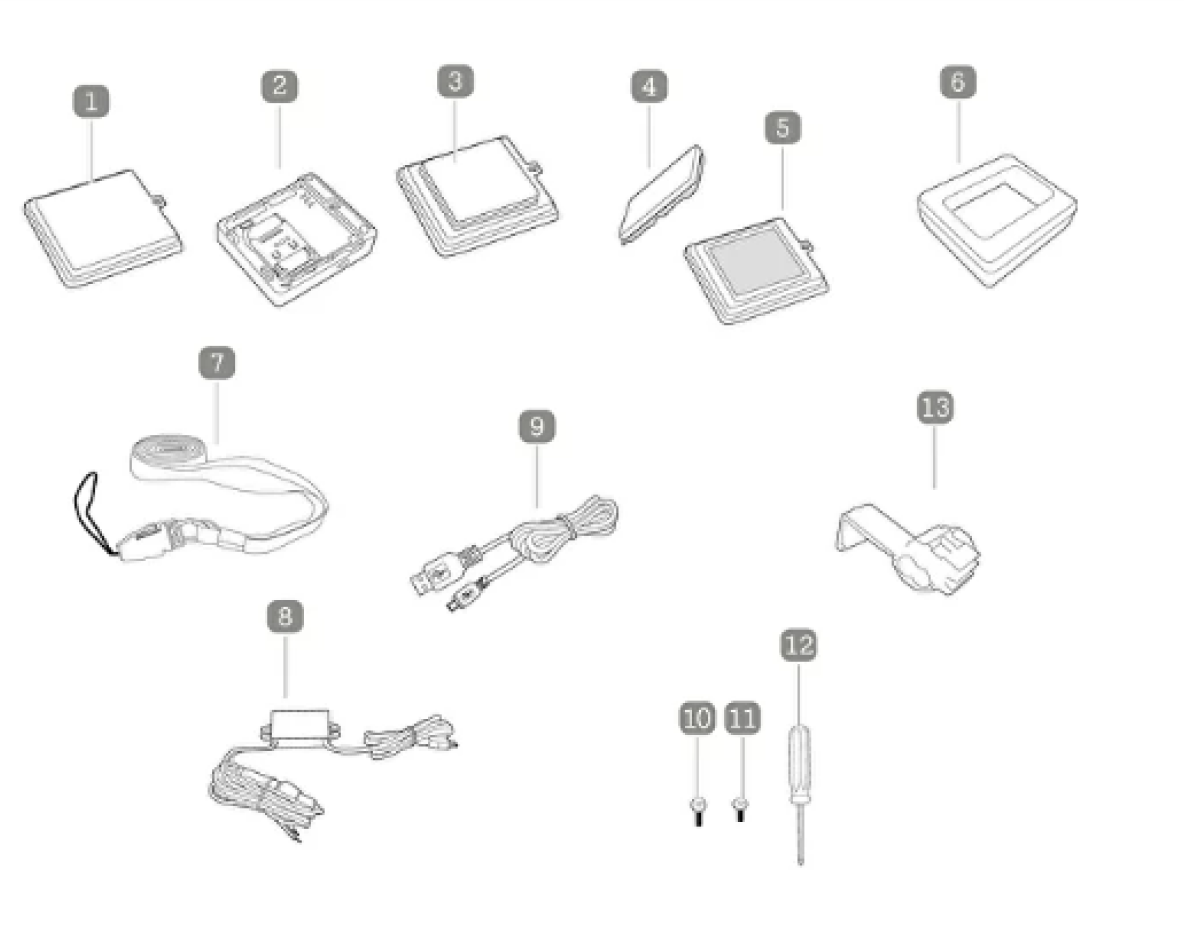
1. Battery cover with clipper
2. Sim Card
3. Battery
4. Magnet
5. Battery cover Velcro fastener
6. Water repelling silicone case
7. Lanyard with clip
8. USB Car adaptor
9. USB charging Cable
10. Screws for the battery cover clopper
11. Screws for the battery Velcro fastener
12. Screwdriver
13. Clip
Botones
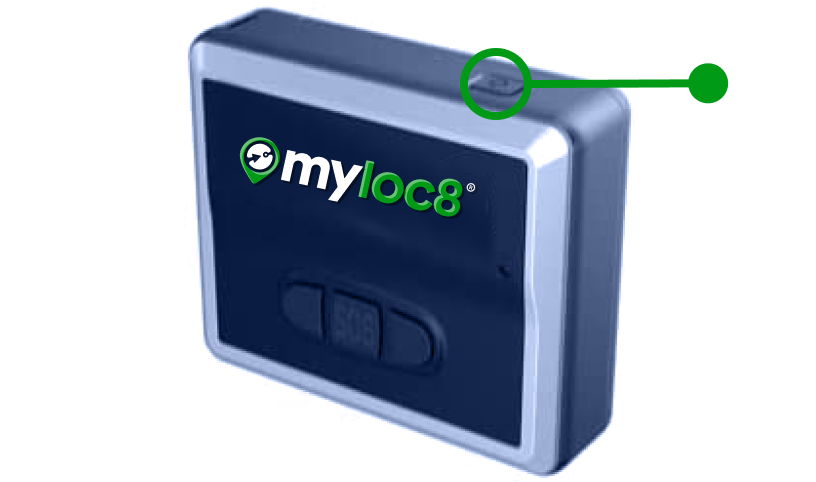
ON / OFF button
Press and hold the ON/OFF button to turn the tracker ON or OFF. Briefly press the ON/OFF button once to check whether the tracker is on.
Please note: If the green light flashes, the tracker is ON. If no light comes on, the tracker is OFF.
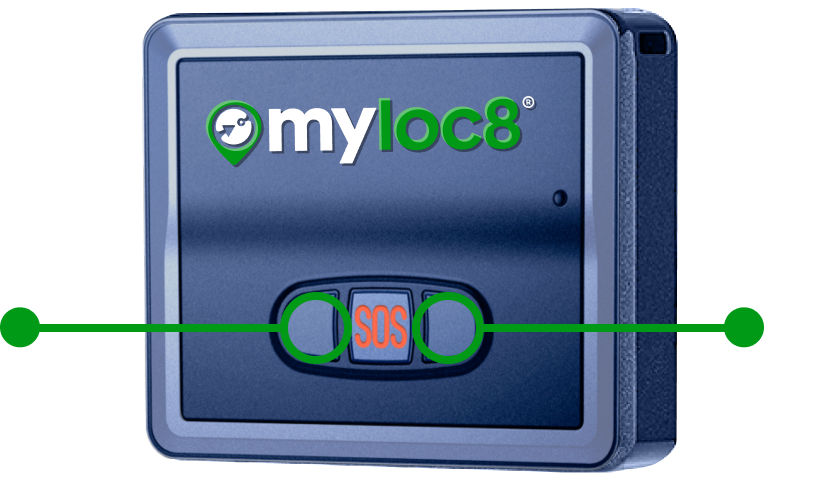
Left / Right
If you press on of the two buttons, you can send a message to the telephone number or e-mail address you have provided. It shows the following text message: “Left button pressed” or “Right button pressed”
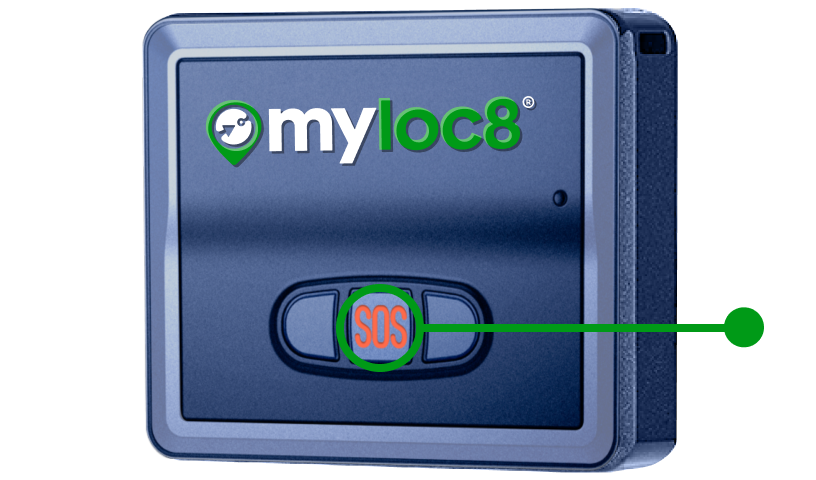
SOS button
If you press the SOS button for at least 2 seconds, the location and a text message will be sent to the telephone number or e-mail you have provided.
Luces

Device is starting up
Long press on power button

Device is powering off
Long press on power button

Device is online
Single press on power button

Device is on but offline
Single press on power button

Activate SOS mode
Long press

Low battery

Battery is charging
Connect to power